
Free billing software that works offline
Create GST invoices, quotations and receipts on your own computer. Invoiceo is a free, open-source desktop app — no subscription, no sign-up, and your business data never leaves your PC.
- Free forever
- Open source
- Works offline
- No sign-up

What Invoiceo costs you
Free forever · Open source (MIT)
- GST & UPI QRCGST, SGST, IGST, HSN/SAC
- A4 & thermalA4, A5, A6 and 58/80 mm
- 8 languagesincluding Tamil and Hindi
- Backup & restoremove to a new PC any time
- MIT Licenseopen-source licence
Why Invoiceo
Billing software without the monthly bill
Everything a small business needs to bill customers is included — and it all runs on your own computer.
Free forever
No subscription, no trial, no paid tier. Every feature is included, for as long as you use it.
Works offline
Bill, print and run reports with no internet connection. Internet down? Keep billing.
Your data stays with you
Customers, products and invoices are saved on your computer, not on someone else’s server.
Open source
The source code is public under the MIT License. Anyone can check what the app does.
Windows, macOS and Linux
One app for the computers you already have, with the same features on each.
No lock-in
Back up any time, restore on another computer, and export your lists to CSV or PDF.
How it works
From setup to payment in five steps
Invoiceo follows the way a shop already bills — just faster and tidier.
- 01
Set up your business
Add your company name, logo, GSTIN, bank details and UPI ID once.
- 02
Add customers and products
Import a list from CSV, or add them as you bill. Barcode scanners work too.
- 03
Create an invoice
Pick the customer and search or scan items. Tax and totals are worked out for you.
- 04
Print, save or share
Print on A4 or a thermal printer, or save a PDF to send to your customer.
- 05
Track payments
Record full or part payments, print receipts and see who still owes you.

Features
All the billing tools a small shop needs
Grouped the way you work — and every one of them is free.
Invoicing
- Six invoice designs plus a thermal receipt layout
- Print or save PDF on A4, A5, A6 or 58/80 mm
- Automatic invoice numbering with your prefix
- Discounts, taxes and extra charges
- Your own custom fields on invoices
- Save unfinished invoices as drafts
Running the business
- Quotations that become invoices in one click
- Full and part payments, with receipts
- Customers with outstanding balances
- Products and services, stock, batch and expiry
- Sales, tax, receivables, daily and stock reports
- Import and export lists as CSV
India & GST
- Your GSTIN and your customer’s on every invoice
- HSN/SAC codes per product
- CGST + SGST or IGST worked out for you
- Tax Invoice or Bill of Supply titles
- Your UPI QR code printed on the bill
Local-first and private
- Works with no internet connection
- Data saved on your own computer
- Backup and restore in one click
- Several companies on one computer
- Staff logins with admin or user roles
- No online account needed
Ready for anywhere
- Choose your currency
- English, Tamil, Hindi, Nepali, French, Spanish, Chinese and Tibetan (partly translated)
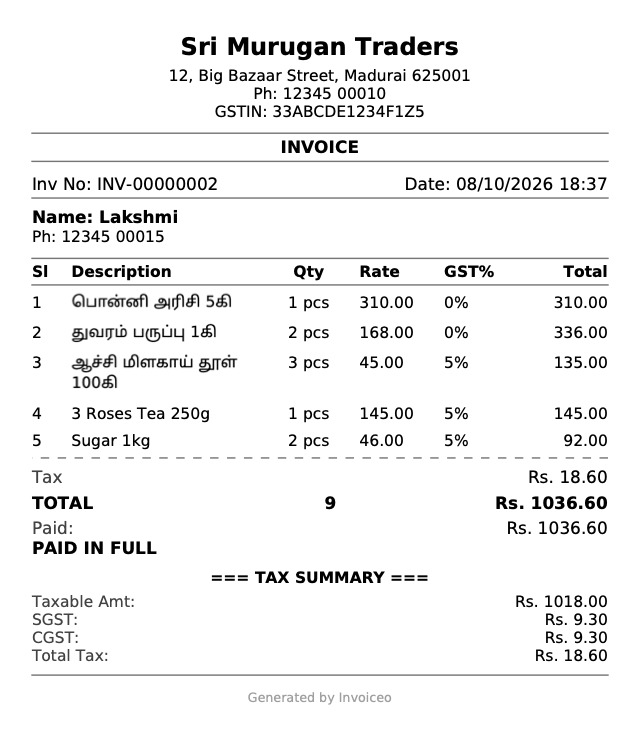
- Tamil text prints correctly on PDFs and receipts
- USB barcode scanners
- Thermal receipts can print automatically after each sale
Screenshots
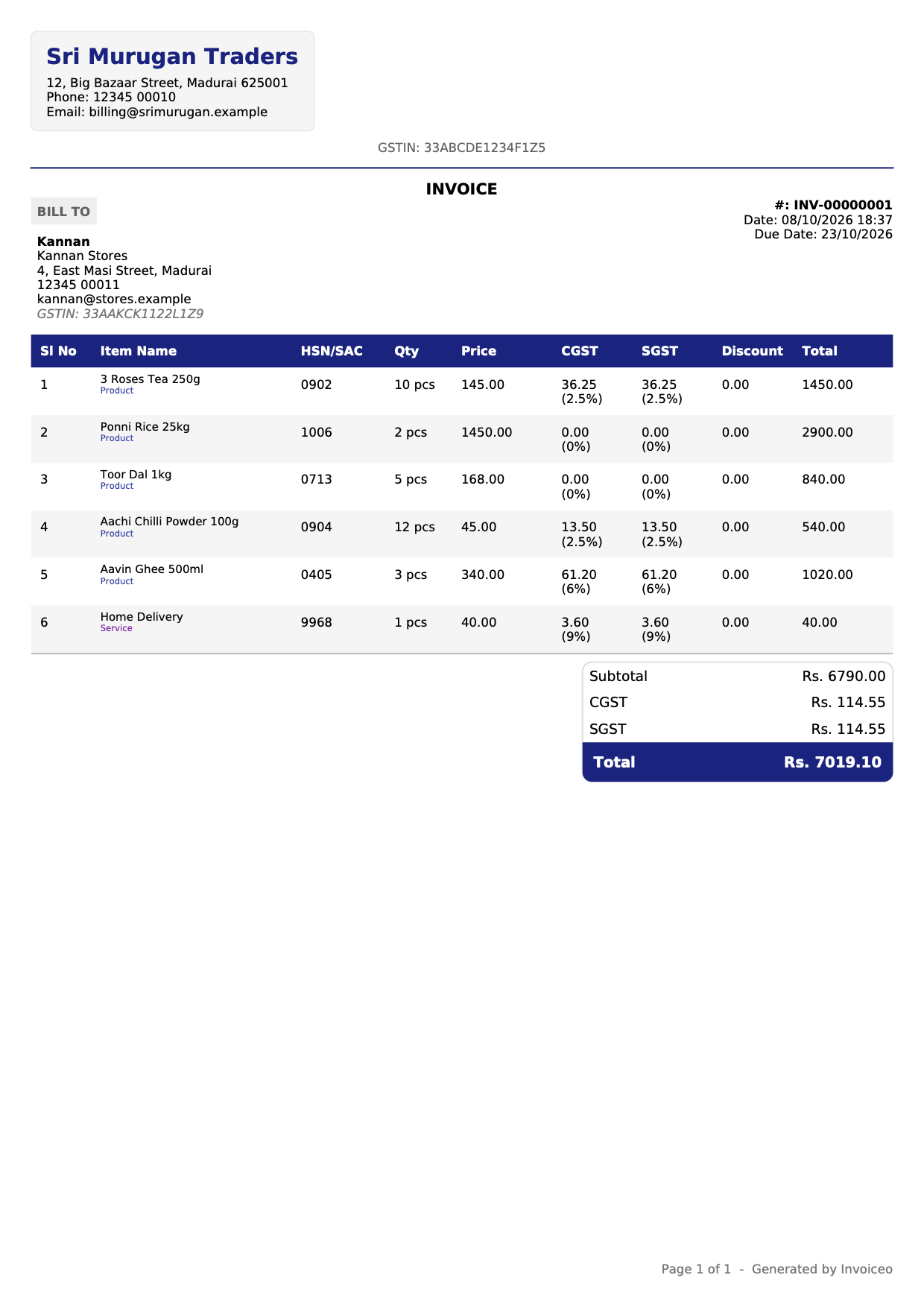
See every screen before you install
Real screens from Invoiceo and documents it printed, filled with a sample shop’s data.


Who it’s for
Built for the way small businesses work
Kirana and retail shops
Fast counter billing with barcode scanning and thermal receipts.
Pharmacies and medical shops
Batch numbers and expiry dates on products, with low-stock warnings.
Traders and wholesalers
GST invoices with HSN codes, stock levels and customer balances.
Freelancers and consultants
Clean PDF quotations and invoices, and a clear view of who has paid.
Service and repair shops
Quick bills for parts and labour, part payments and receipts.
Any small business
Several companies and staff logins on one computer — all free.
Local and global
Built for local businesses. Ready for the world.
Invoiceo is made in India for Indian billing rules, and works just as well anywhere else.
Made for India
- GSTIN, HSN/SAC and CGST + SGST or IGST
- UPI QR code on your invoices
- Amounts in rupees by default
- Tamil and Hindi on screen and on paper
Works anywhere
- Pick the currency you bill in
- Eight app languages (Tibetan partly translated)
- A4, A5, A6 and 58/80 mm paper
- GST fields stay out of the way when you don’t need them
App languages
Privacy
Your business data belongs to you.
Invoiceo keeps everything on your computer. Nothing about your customers, prices or sales is sent to us or anyone else.
- Works without internet
- Saved on your computer
- No account, no subscription
- Backups when you choose
- Invoices
- Customers
- Products
- Backups
Nothing is uploaded. There is no Invoiceo cloud and no account to sign in to.
Open source
Built in the open
Invoiceo’s source code is public under the MIT License. You don’t have to take our word for anything.
- Read exactly how the app handles your data
- Free to use, copy and change under the MIT License
- Use it free, on as many computers as you like
MIT License
Invoiceo is built on Invoiso by ANOOP P, which is also released under the MIT License. Read the licence text on the Licenses page.
How can it be free?
Invoiceo is made by Madcreations and built on Invoiso, an MIT-licensed project. There is no paid version. Development is supported by optional paid customization for businesses that need something special, and by donations.
Windows
Windows 10 and 11 · 64-bit
Invoiceo-Setup-Windows.exe
Windows may say “Windows protected your PC”. Click More info, then Run anyway. The installer isn’t code-signed yet.
macOS
macOS 12 Monterey or later
Invoiceo-macOS.dmg
Drag Invoiceo to Applications. If macOS can’t check the app, open System Settings → Privacy & Security and click Open Anyway.
Linux
Ubuntu 22.04+, Debian 12+, Mint 21+ and others
Invoiceo-Linux.deb
Invoiceo-Linux.AppImage
Install the .deb with sudo apt install ./Invoiceo-Linux.deb, or run chmod +x Invoiceo-Linux.AppImage and open the AppImage.
Check your download with the SHA-256 checksums
Up and running in minutes
- Step 1
Download
Pick your computer above.
- Step 2
Install
Open the file and follow the steps.
- Step 3
Sign in and set up
The first screen shows how to sign in. Then add your business details.
- Step 4
First invoice
Add a customer and items, then create the invoice.
- Step 5
Print or PDF
Print on A4 or a thermal printer, or save a PDF.
FAQ
Questions people ask before downloading
Is Invoiceo really free?
Yes. Every feature is free, with no trial, subscription or paid tier. Install it on as many computers as you like.
Does it work offline?
Yes. You only need the internet to download it. Billing, printing and reports all work offline.
Where is my data stored?
On your computer, in Invoiceo’s data folder. Use Settings → Backup to keep a copy somewhere safe.
Which computers does it run on?
Windows 10 and 11 (64-bit), macOS 12 or later, and Linux (.deb or AppImage).
Can I use it outside India?
Yes. Choose your currency and language; GST fields can be turned off when you don’t need them.
How can it be free?
There’s no paid version. Optional paid customization and donations support development.
Is Invoiceo open source?
Yes. It is released under the MIT License, so anyone can read, use and change the code.
Do I need an account?
No online account. The app has its own login on your computer, so each person can have a password.
Does it support GST and UPI?
Yes — GSTIN, HSN/SAC, CGST + SGST or IGST, and your UPI QR code on invoices.
Can I move to a new computer?
Yes. Make a backup, install Invoiceo on the new computer and restore the backup there.
Is it right for a small shop?
Yes — barcode scanning, thermal receipts, stock tracking and daily sales reports are built in.
Why does Windows warn me when installing?
The installer isn’t code-signed yet. Click More info, then Run anyway.
Still unsure? Ask us on WhatsApp, read all the answers or contact us.
Simple billing. No monthly bill.
Download Invoiceo and create your first invoice today.